A thoughtful desk upgrade can make work calls clearer, free up space, or simplify the connection between a laptop and the rest of a workspace.
These 12 home office tech gifts cover practical accessories, audio gear, and workstation upgrades for different routines and budgets.
12 Home Office Tech Gifts for Remote Workers and Desk Setups
FIFINE T669 USB Microphone Kit

- USB connection supports plug-and-play setup with a PC or laptop.
- The kit includes a boom arm stand and double pop filter.
- The cardioid capsule captures sound from the front.
Best Gift For: Remote workers who record podcasts, voiceovers, or frequent online calls.

TP-Link Archer AXE75 WiFi 6E Router

- Tri-band WiFi 6E includes a 6 GHz band.
- OFDMA technology supports simultaneous transmission to more devices.
- OneMesh can create a network with a compatible TP-Link extender.
Best Gift For: Remote workers who want a router that supports simultaneous connections to more devices.
HUANUO FlowLift Dual Monitor Stand

- Each arm fits a monitor weighing 4.4 to 19.8 lbs.
- The mount offers tilt, swivel, and rotation adjustments.
- Built-in cable management guides wires along the arms.
Best Gift For: People who work across two compatible screens and want a more flexible desk layout.
Nulaxy Pull-Out Height Adjustable Laptop Stand

- The stand fits laptop sizes from 10 to 17 inches.
- A pull handle lets users switch posture quickly.
- It folds for compact storage on a desk or in a bag.
Best Gift For: Laptop users who want to adjust screen height between sitting and standing at a desk.
SteelSeries Apex Pro Gaming Keyboard

- Per-key actuation offers 40 adjustment levels.
- The OLED display shows information from games and apps.
- USB passthrough connects an additional USB-powered device.
Best Gift For: People who value adjustable key response for gaming and everyday computer use.
Audioengine A2+ Wireless Desktop Speakers

- Bluetooth supports wireless streaming from phones, tablets, and computers.
- USB-C, RCA, and 3.5mm AUX inputs support wired connections.
- Real wood cabinets give the speakers a finished desktop look.
Best Gift For: Desk workers who enjoy music, podcasts, or clear audio for video calls.
SABRENT USB-C Hub and M.2 SSD Dock

- The hub has three USB Type-A ports.
- HDMI supports an external display up to 4K@60Hz on compatible devices.
- The M.2 slot supports SATA or NVMe SSDs.
Best Gift For: Laptop users who need a hub for connecting peripherals, an external display, and portable storage.
BESTEK USB Power Strip Tower
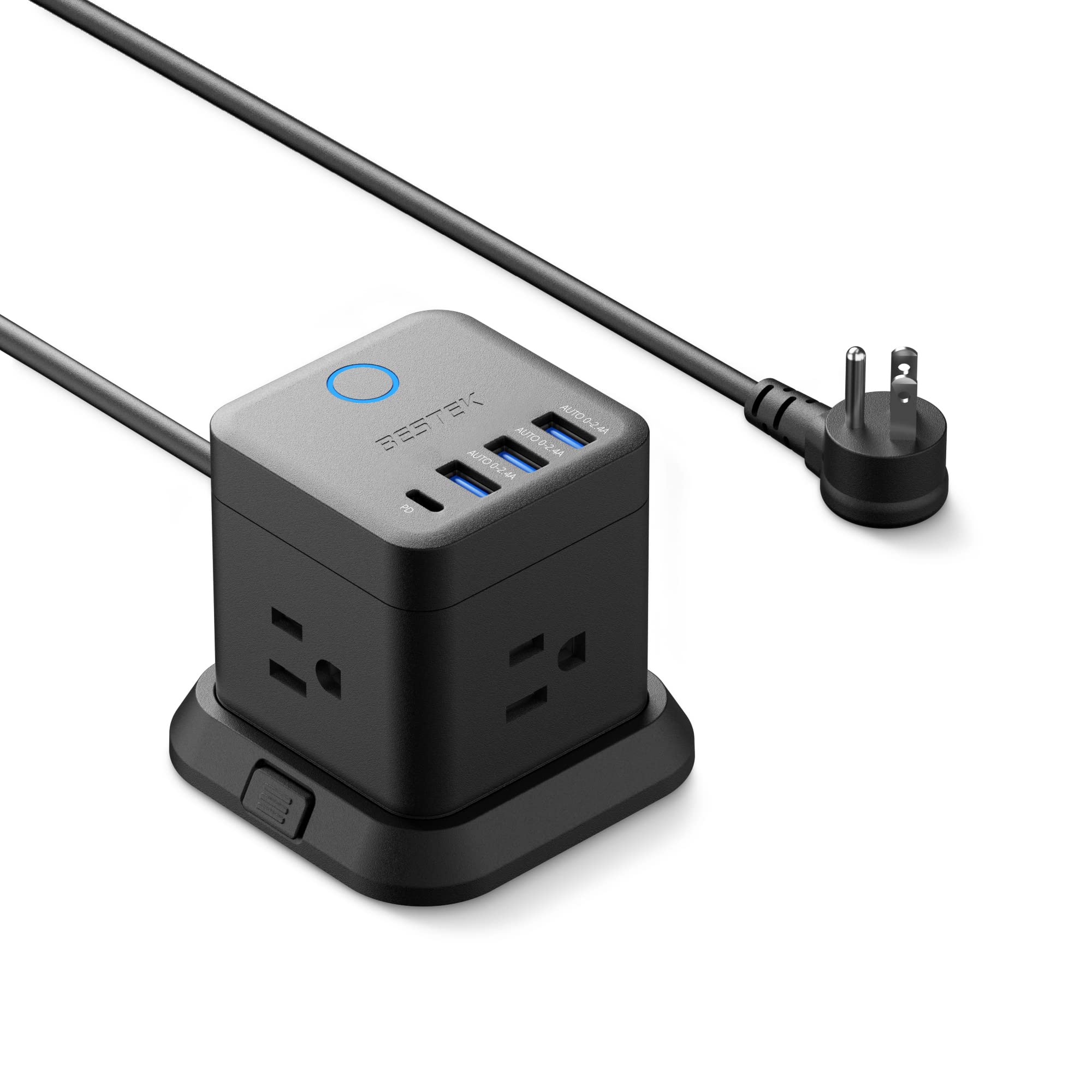
- It has three outlets, three USB-A ports, and one USB-C port.
- The tower can be mounted on a desktop, under a table, or on a wall.
- The flat plug is angled to fit narrow spaces.
Best Gift For: Someone organizing device charging around a desk, bedside table, or shared workspace.
LISEN MagSafe Power Bank for iPhone and Apple Watch
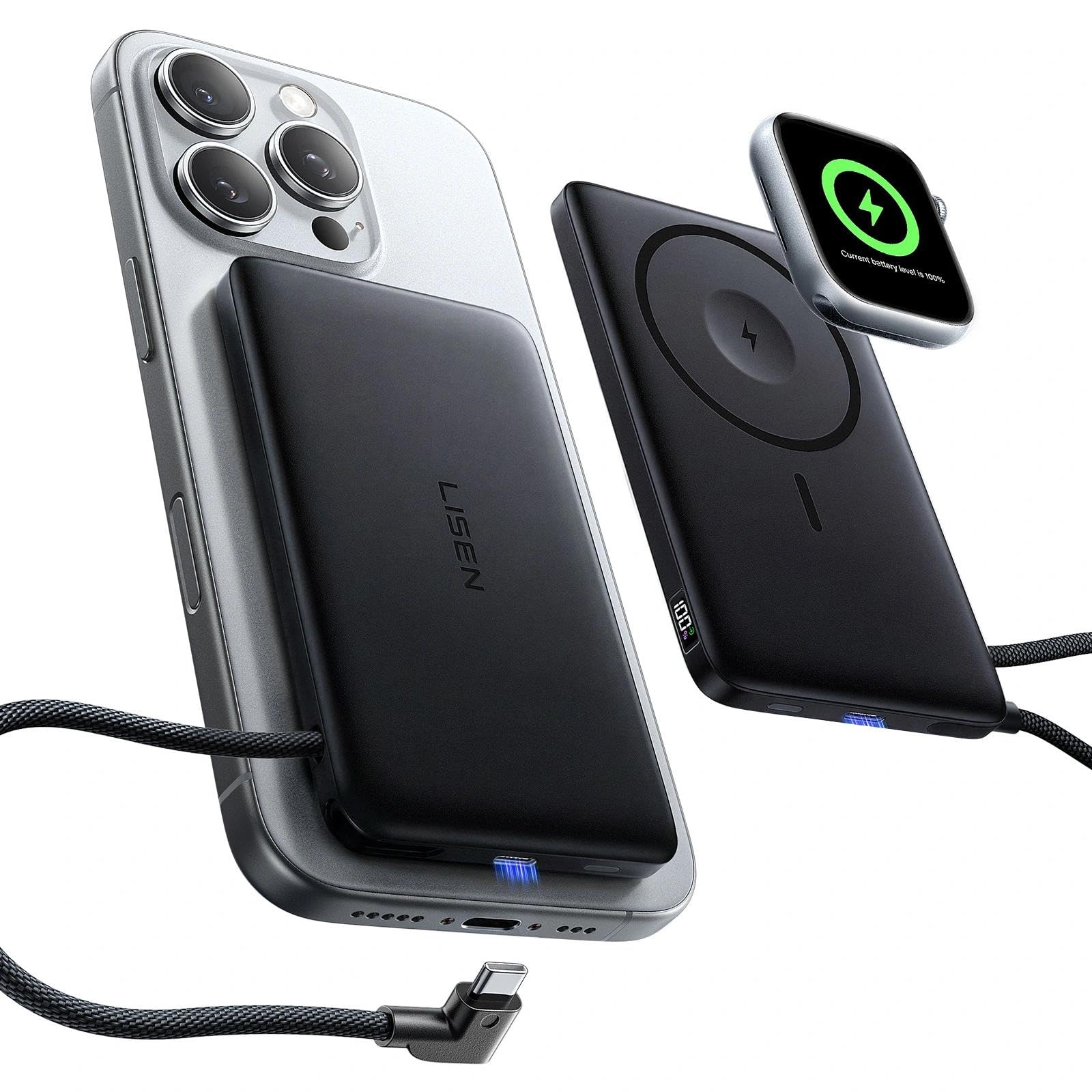
- The 10000mAh battery pack supports MagSafe and Apple Watch charging.
- A built-in USB-C cable can charge compatible devices.
- A digital display shows remaining power and charging status.
Best Gift For: Someone who uses a compatible iPhone and Apple Watch and wants portable charging options.
JLab Go Work Wireless Headset

- Bluetooth multipoint connects two devices simultaneously.
- A boom microphone rotates out of the way for listening.
- A red LED indicates when the microphone is muted.
Best Gift For: Remote workers switching between laptop and mobile calls or video conferences.
SABRENT USB-C and USB-A SD Card Reader

- Dual slots read SD and Micro SD cards.
- USB 3.0 transfers reach up to 5Gbps.
- The compact reader has a built-in activity indicator.
Best Gift For: Photographers and laptop users who often transfer files from SD or Micro SD cards.
SteelSeries Aerox 3 Wireless Gaming Mouse

- The wireless mouse supports 2.4GHz and Bluetooth 5.0 connections.
- Its 3-zone RGB lighting has configurable colors.
- The shell design reduces weight to 68g.
Best Gift For: A remote worker who also enjoys wireless PC gaming and customizable RGB lighting.
Choosing home office tech gifts for the way someone works
The most useful home office tech gifts solve a recurring friction point. Think about what interrupts the recipient’s workday: unclear calls, a crowded surface, limited laptop connections, or audio that makes listening tiring.
A small improvement to a daily routine can feel more personal than a flashy device that rarely leaves its box.
Start with the setup they already use. A laptop-only worker may appreciate a more flexible screen position, while someone who keeps a second monitor on the desk may value adjustability and cable tidiness.
For frequent meetings, consider how the person moves between computer and phone calls, and whether a microphone or headset better suits their space and habits.
Match the gift to the room as well as the task. A shared room may call for compact gear that folds away or supports quieter personal listening.
Someone with a dedicated workspace may enjoy a more substantial audio or keyboard upgrade. If you are unsure, notice which tools are already within easy reach and which small annoyances come up repeatedly in conversation.
Budget tradeoffs that matter in a work setup
For a modest spend, practical accessories can still make a thoughtful difference. A card reader, charging hub, or compact power solution can be useful when it matches the person’s devices and the way they move files or charge equipment.
These are especially suitable when you want to add convenience without asking the recipient to redesign a whole desk.
With a larger budget, consider whether the gift would replace or complement something the recipient already owns. A keyboard, speakers, or router can affect several parts of a workday, but they also call for more confidence about preferences and compatibility.
For home office tech gifts, the right fit often matters more than adding the most features.
Before buying, check current prices and the exact model details. Compare the intended connection types, desk space, device compatibility, and any required accessories.
For a mount or stand, confirm the recipient’s workspace can accommodate it; for a network or audio upgrade, consider whether it can work with equipment already in use.
Make the gift personal and easy to set up
A practical device feels more thoughtful when it reflects the person’s routines. For a colleague who spends much of the day on calls, pair a headset or microphone with a handwritten note wishing them calmer meetings.
For someone who enjoys music while working, a speaker upgrade can acknowledge a small pleasure that makes long stretches at the desk more enjoyable.
Presentation can help a technical gift feel welcoming. Include a short note explaining why you chose it, and keep packaging, manuals, and any included cables together.
If you are giving a desk accessory, you might add a small cable tie or a simple card with setup suggestions, provided those extras are easy and appropriate for the recipient.
Avoid guessing about personal preferences when there is an easy way to check. A quick conversation about their preferred keyboard feel, phone model, port needs, or workspace dimensions can prevent a well-meant gift from becoming an awkward return.
For a surprise, choose an accessory with a clear everyday purpose and verify compatibility quietly with someone who knows the setup.
Last-minute buying advice for a useful surprise
When time is short, choose the simplest gift that fits a known need. A compact accessory can be easier to match than equipment that depends on precise preferences or a complex desk arrangement.
If you know the recipient often transfers photos, for example, a suitable card reader may be a straightforward choice; if their needs are less clear, a gift receipt can preserve flexibility.
Check the product page for current compatibility, included items, dimensions, and delivery estimates before ordering. Delivery timing can change, so avoid promising an arrival date unless it is confirmed at checkout.
If the physical gift may arrive after the occasion, a printed note or a small card explaining the planned upgrade can still make the gesture feel intentional.
For a shared office or household, consider where the device will be used and whether it needs to stay portable. A gift that supports a specific routine—such as a call-heavy workday, an orderly charging area, or a laptop that moves between rooms—is more likely to fit naturally.
Keep the note personal and focused on the recipient’s work habits.