Shopping for a gamer can mean choosing something for the way they play, stream, or organize their desk. These ideas range from everyday accessories to larger setup upgrades.
For a more personal pick, think about what they use most and check compatibility before choosing a device.
10 Gift Ideas for Gamers to Upgrade Their Setup
SteelSeries Arctis Nova 7P Wireless Gaming Headset

- Connects wirelessly with a portable USB-C dongle for PC, PlayStation, Switch, or tablet.
- Can mix mobile calls or music with game audio at home.
- The retractable microphone can be tucked away for a commute.
Best Gift For: A console or PC gamer who wants wireless game audio with the option to mix in calls or music.

SteelSeries Apex Pro TKL Gaming Keyboard

- Offers adjustable actuation with 40 levels per key.
- A key can be programmed for two different actions.
- The tenkeyless form factor includes a detachable USB-C connection.
Best Gift For: A PC gamer who likes tailoring key response and programming alternate actions.
FIFINE AmpliGame AM8 XLR/USB Gaming Microphone

- Offers USB and XLR connectivity for connecting to devices or a mixer sound card.
- Has a tap-to-mute control and gain knob.
- Its RGB lighting can be changed with a tap when using USB.
Best Gift For: A gamer who streams, records voiceovers, or wants a microphone for podcasting.
SteelSeries Rival 5 Gaming Mouse

- Its programmable layout has nine buttons, including five quick-action side buttons.
- The optical sensor provides one-to-one tracking.
- It has PrismSync RGB lighting.
Best Gift For: A gamer who plays FPS, MOBA, MMO, or battle royale games and wants programmable side controls.
HUANUO FlowLift Dual Monitor Desk Mount

- Each arm supports a screen weighing 4.4 to 19.8 lbs with compatible VESA mounting holes.
- The full-motion stand supports tilt, swivel, and rotation adjustments.
- Cable management guides wires along the arms.
Best Gift For: A gamer with two compatible monitors who wants to free up desktop space.
TP-Link AXE5400 Tri-Band WiFi 6E Router

- The router has a 6 GHz band for gaming and video chatting.
- Tri-band and OFDMA technology support simultaneous transmission to more devices.
- OneMesh can create a mesh network with a TP-Link OneMesh Extender.
Best Gift For: A gamer upgrading a home network shared with people streaming or using multiple devices.
Valerion VisionMaster Pro2 4K Laser Projector
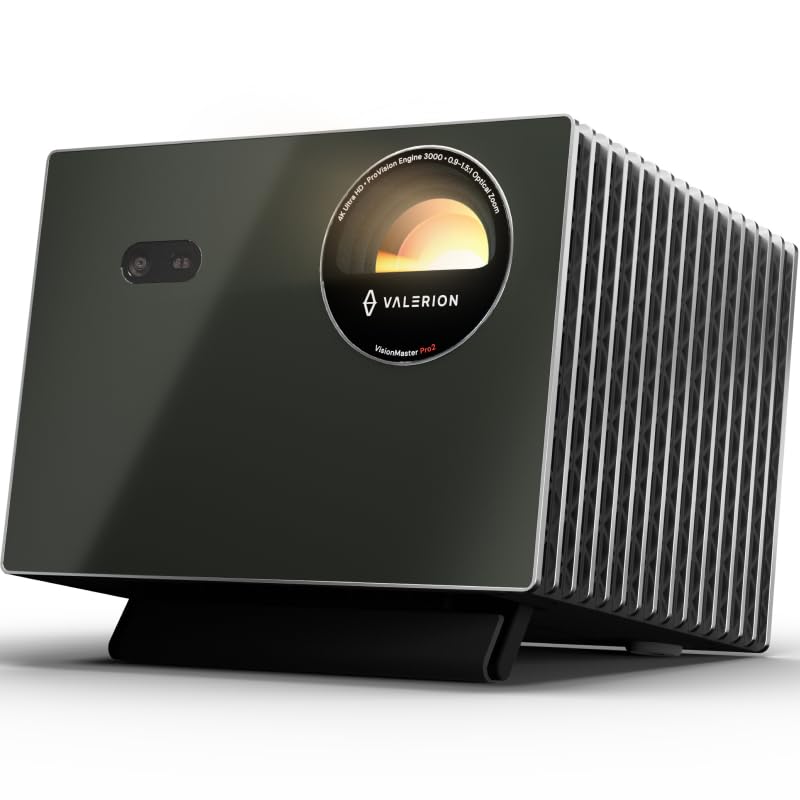
- Supports 4K UHD clarity with HDR10+ and Dynamic Tone Mapping.
- Offers 4ms input lag and a 240Hz refresh rate on ultra-wide screens.
- Includes Google TV and supports AirPlay 2, Miracast, and Chromecast.
Best Gift For: A gamer who wants a projector for large-screen gaming and home entertainment.
Nylavee Computer Speakers with Lighting Modes

- The speakers have six touch-controlled lighting modes.
- A single knob controls power and volume.
- The audio connection uses a 3.5mm cable, with USB for power.
Best Gift For: A gamer who wants desktop speakers for games, videos, and movies with customizable lighting.
Nulaxy Pull-Out Height Adjustable Laptop Stand

- The stand height adjusts from 1.2 to 20 inches.
- It supports up to 22 lbs.
- The foldable stand is compact when folded.
Best Gift For: A laptop gamer who shifts between sitting and standing at a desk.
SABRENT USB-C Hub and M.2 SSD Dock

- The dock includes an M.2 slot for SATA or NVMe SSDs.
- Its HDMI port supports an external display up to 4K at 60Hz on compatible devices.
- It has Gigabit Ethernet and up to 90W bypass charging power delivery.
Best Gift For: A laptop or handheld gamer who wants extra ports, external display connectivity, and an M.2 storage slot.
Choosing gifts for gamers by setup
When choosing gifts for gamers, start with the part of the setup they use most. A player who spends evenings in voice chat may appreciate audio gear, while someone who streams or records may get more use from a microphone with controls close at hand.
Think about their platform and play style. A mouse with programmable buttons may suit someone who switches between several game genres, while a keyboard with adjustable actuation appeals to a player who enjoys customizing how keys respond.
For a console player, confirm that the accessory works with their system before buying.
Setup changes can depend on what they already own. A dual monitor arm needs compatible screens and a desk that can accommodate its mounting method.
A router upgrade is more appropriate when the household has several connected devices and the recipient can update their network gear.
Balance the gift with the setup and budget
Gaming gifts span small desk additions and major room upgrades, so decide whether you want a practical accessory or a centerpiece. Speakers, a mouse, or a hub can be easier to fit into an existing setup; a projector or network upgrade calls for more planning and a larger budget commitment.
For gifts for gamers, consider the full cost of using the item. A hub with an SSD slot may be most useful if the recipient already has a compatible drive or plans to add one.
A projector can require a suitable space and compatible connections. Check current prices and any additional equipment they may need before deciding.
A less expensive gift can still feel personal when it solves a daily annoyance. Look for clues such as crowded ports, a desk full of cables, or frequent use of voice chat.
If you are uncertain, choose a flexible accessory and verify that it fits their existing devices.
Personalize the gift and presentation
For gifts for gamers, personalization can come from matching the recipient’s setup rather than adding a novelty. Notice whether their desk has a consistent color scheme, whether they use a laptop or desktop, and whether they value a clean workspace or visible lighting.
Those details help narrow the choices without asking them to replace a favorite device.
You can make the presentation thoughtful by including a short note about why you picked the item: perhaps it suits their streaming sessions or creates more room at their desk. For a larger accessory, wrap a small card that explains what compatibility details to check together, preserving the surprise while avoiding a mismatched fit.
If you want the gift to feel complete, pair a useful accessory with a simple personal touch, such as a handwritten message or a favorite snack for a game night. Keep any added items modest and relevant to how they spend time at the computer.
Plan ahead for compatibility and delivery
Before ordering, check the recipient’s device connections, desk arrangement, and available space. For a monitor arm, verify the monitor mounting pattern, screen weight, and desk construction.
For a USB-C hub, confirm that the laptop or handheld supports the display connection they intend to use.
Review current product details for compatibility and dimensions, and check delivery estimates early if the gift is for a birthday or holiday. Stock and shipping timing can change, so leave room for a backup plan if the date matters.
Avoid assuming an accessory will work with every console, computer, or home network.
If you need a last-minute option, choose something that is easy to use with equipment the recipient already owns, after checking the relevant connection or platform. A digital gift card to a gaming store can also give them room to choose a specific game or accessory if you cannot confirm the setup in time.
Make the right choice among gifts for gamers
A good gaming gift fits the person’s habits and the space they have, whether that means clearer desk organization, a control they can customize, or a shared entertainment upgrade. The most impressive option is not automatically the most useful one; practical fit tends to matter more over time.
Before you commit, consider whether the recipient prefers to choose their own hardware. You can ask a casual question about their current setup or invite them to help plan a larger upgrade.
That gives you a better chance of matching their devices and leaves room to make a bigger gift feel collaborative.